

How to use Pinterest for Drive Traffic on Blog-

Why Need To Use Pinterest for Drive Traffic on Blog?


Why Need To Use Pinterest for Drive Traffic on Blog?
More than 250 million people use Pinterest. Most of them are female, Half of all U.S. millennials use Pinterest, for instance. But it’s not just young people share their ideas on the network: 68 percent of U.S. women between the ages of 25 and 54 use Pinterest too And while it’s true that the network does have more female users than male, 40 percent of new users are men. Most of the user come from US, UK, Australia, Germany and all over the world. Maximum people use Pinterest to buy their needs or products.
Bonus: Download Guide for How Use Pinterest to drive traffic and How to Earn 4 Digit Money every Month.
Which Account Needs Start to Use Pinterest for Drive Traffic on Blog?
To start Pinterest you can create two types of account on here. One of them is a personal account and another one is a business account. For your blog and other things that you promote on here, you need to create a business account. For creating Business Go on pinterest.com
Give here your Email, Password, Business name(Try to use Your blog or website name on this Business name), Then put the Categories that you write on your blog or website. Then put your blog or website link on here.
How Complete Setting to use Pinterest for Drive
Traffic on Blog?
Customization of your Pinterest account is very important to generate traffic from Pinterest. When your Pinterest Business account customizations are done then can generate more traffic on your blog from Pinterest. So must Complete Setting on Pinterest for your Pinterest Marketing.
How Select Affiliate Marketing Product to get Huge Sale
How Select Affiliate Marketing Product to get Huge Sale
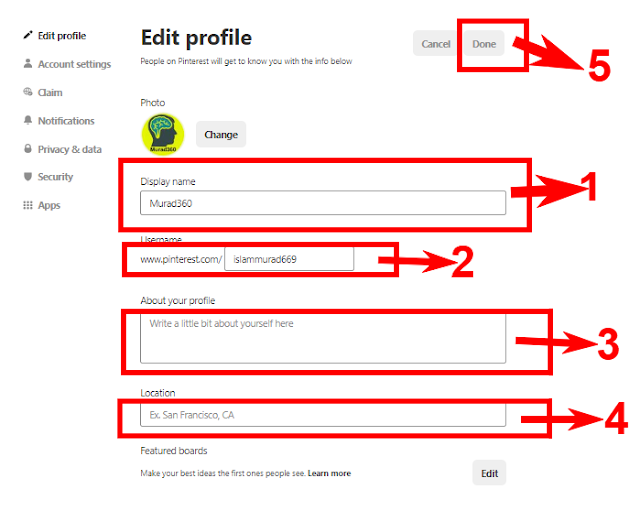
Step 1: Complete your profile.
Go on you setting complete all details that I show on the red mark 1 to 5 and try to give it unique and your blog related.
Go on you setting complete all details that I show on the red mark 1 to 5 and try to give it unique and your blog related.
Step 2: Confirm your website, Instagram, YouTube:
Must add at least your blog or website on here that I show the number 1. When trying to add this you can see some HTML code. Some Step to Your Blog or Website with Pinterest: