Showing posts with label Blog Traffic. Show all posts

Which Source help you To get Huge Traffic on Blog or website or Article or Affiliate Product

Which Source help you To get Huge Traffic on Blog or website or Article or Affiliate Product

There are several ways to get real traffic. But Most Effective traffic is Organic search traffic.
Ways to getting Real Traffic:
SEO(Search Engine Optimization): SEO is the most important part of a blog or article. SEO give you Organic traffic and your blog or article rank day by day when organic traffic comes on your blog or article. Without optimizing SEO on your blog or article you cannot rank your blog or article on the google search engine. So must know about SEO to get organic traffic on your blog. You can read this eBook to learn SEO. This eBook completely teaches you:

Learn More Here SEO

Social Media: From Social Media, you can get huge traffic but There has to follow some trick
  • For Facebook: Build Your Facebook Page or Group or Profile or Join some Big Group that your Product, Service or that you want to promote, related.
  • Don't put the direct link anywhere on facebook.
  • First post some medium size article without any link on Facebook to build your profile to get the trust of your ordinance. After 3/5 post you write a small article like that “ Hello everyone, I generate I week 5,00,000 traffic on my blog, If you want to learn How can I drive Huge Traffic on my blog, Comments under I will give you my trick to get huge traffic.
When someone comments on your post Don't give your product or service like on reply section. Give him your answer on message. These people must see your offer and you can generate a lead.
  • Pinterest: Must use Pinterest to get real traffic. Because More than 250 million people use Pinterest. Most of them are female, Half of all U.S. millennials use Pinterest, for instance. But it’s not just young people share their ideas on the network: 68 percent of U.S. women between the ages of 25 and 54 use Pinterest too And while it’s true that the network does have more female users than male, 40 percent of new users are men. Most of the user come from US, UK, Australia, Germany and all over the world. Maximum people use Pinterest to buy their needs or products. You can drive Huge free traffic from Pinterest.
    You can use tools to get more traffic from Pinterest.
You can use Other Social Media like Twitter, Linkedin, Reddit, Tumlar, etc.
Forum Posting: The Best way to increase domain authority, website traffic, local and global search engine, and permanent backlinks is Forum posting. Here are some Benefits of Forum Posting:
·        Search Engine crawl regularly reputed from the post.
·        You will get a permanent backlink when you post on the forum.
·        You will get the best comment to the expert.
·        Automatically create a deep link to our client website.
Guest Posting: Guest posting is a great way to create a presence and promote your website to your target audience. Guest post is an important part of the off-page SEO, allowing it to get backlinks from relevant sources which will not only prove your authority but also drive traffic.
Comments Posting: Post comments some website that your article related. When you post this you get Backlink of your site. that can help you to rank your blog or article.
Email Marketing: Collect email for email marketing. You can use Hellobar to collect email on your website. When you collect some Email then send him an email on your article. Learn Email Marketing on here
Ping Post: Pin post helps you to submit your post on a different search engine. It can help you to rank your site quickly. Some Pin posting Site:
Questions - Answers: Try to give the answer on question and answer site. It can help you to get a backlink and increase targeted traffic.
If you can follow this Process Hope You can Drive Huge Traffic On Your Blog or Article.


How to Add Social Media Button Free on Your Blog or Website

How to Add Social Media Button Free on Your Blog or Website

How to Add Social Media Button Free on Your Blog or Website
Why Need to Add Social Media Button on Your Blog or Website?
Maintaining a blog is not easy because it takes time to make an issue intelligent, write posts, edit the post, and then monitor the comments. If you are going to devote all the time to your blog then you want to get it the most, is not it? How many blogs can read this blog successfully and an important way to increase reading is a blog successfully incorporates social share buttons in each blog post.

How Many ways to add social media button on blog or website.
There is two way to add a social media button on your blog or website.
  • Own HTML
  • Use Third Party Website (I Recommend To Use Third Party Website)

Why I Recommended to Use Third Party Website to add Social Media Button on your Blog or Website?  
  • When you put your own HTML on your website to add Social Media Button you cannot see the analysis of share.
  • If you use Third party website to add social media button on your website you can see analytics of share on this third-party website.

Benefits to add Add Social Media Icon on Blog or website?
  • Improve Customer Experience
  • Increase Brand Exposure
  • Improve Reach To Your Target Market
  • Influence of SEO Benefits
  • You will get Social Signals
  • Encourage A Good User Experience
  • Develop Natural Links
  • Get More Traffic
  • Add value with Social Share Button
How to Add Social Media Button on Blog or Website?
To add social media button on your website you can Use some website like SUMOME, Get Social, Shareaholic, Sharethis, Addthis, Warfareplugins .
Here are multiple sites, that helps you to add a social media button on your website. In this article, I describe how you can add a social media button on your website from SUMOME.
Step 1:
  • Go on SUMOME.
  • Create an account here with your email, you can also use your Google+ account to create an account here.
    How to Add Social Media Button Free on Your Blog or Website
Step 2:
  • When you account create done, now login here.
  • You can see a page, here put a website or blog address.
  • Click on ADD NOW 
    How to Add Social Media Button Free on Your Blog or Website
Step 3:
  • You can see HTML code now.
  • Copy this HTML code
  • Follow Step by step >Go Blogger or WordPress Dashboard > Theme > Edit HTML > Past This HTML code that you copied from sumo down to the < Head >
  • After past on dashboard then go back on sumo and click on START USING SUMO 
    How to Add Social Media Button Free on Your Blog or Website
Step 4:
  • After click on Start using Sumo you can see a dashboard.
  • Now take your mouse pointer on EXTRAS
  • You can see a pop up on here then click on SHARE
  • After Click on share, you can see a page here click on ACTIVE NOW.
    How to Add Social Media Button Free on Your Blog or Website

How to use Pinterest for Drive Traffic on Blog?

How to use Pinterest for Drive Traffic on Blog-
How to use Pinterest for Drive Traffic on Blog?

Why Need To Use Pinterest for Drive Traffic on Blog?

More than 250 million people use Pinterest. Most of them are female, Half of all U.S. millennials use Pinterest, for instance. But it’s not just young people share their ideas on the network: 68 percent of U.S. women between the ages of 25 and 54 use Pinterest too And while it’s true that the network does have more female users than male, 40 percent of new users are men. Most of the user come from US, UK, Australia, Germany and all over the world. Maximum people use Pinterest to buy their needs or products.

Bonus: Download Guide for How Use Pinterest to drive traffic and How to Earn 4 Digit Money every Month.

Which Account Needs Start to Use Pinterest for Drive Traffic on Blog?


To start Pinterest you can create two types of account on here. One of them is a personal account and another one is a business account. For your blog and other things that you promote on here, you need to create a business account. For creating Business Go on pinterest.com

Give here your Email, Password, Business name(Try to use Your blog or website name on this Business name), Then put the Categories that you write on your blog or website. Then put your blog or website link on here.

How Complete Setting to use Pinterest for Drive

Traffic on Blog?

Customization of your Pinterest account is very important to generate traffic from Pinterest. When your Pinterest Business account customizations are done then can generate more traffic on your blog from Pinterest. So must Complete Setting on Pinterest for your Pinterest Marketing.
How Select Affiliate Marketing Product to get Huge Sale
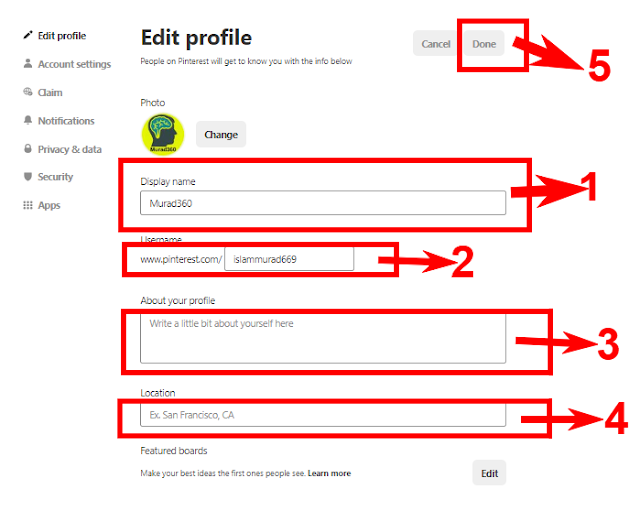
Step 1: Complete your profile.
Go on you setting complete all details that I show on the red mark 1 to 5 and try to give it unique and your blog related.
Step 2: Confirm your website, Instagram, YouTube:
Must add at least your blog or website on here that I show the number 1. When trying to add this you can see some HTML code. Some Step to Your Blog or Website with Pinterest: