Showing posts with label Blogging. Show all posts

10 Best SEO Setup on WordPress | Wordpress SEO Setup Guide

Best SEO Setup on WordPress: Search Engine Optimization (SEO) Setup on Website is very very important for WordPress Because Base on SEO you get organic traffic on your website or blog that helps to place your website or blog in the number one position.

What Is Wordpress?

Wordpress is the CMS that means Open-Source Content Management System. It is provided the way of Structure, Manage and Publish Website even you don't know HTML or any Coding.
37.5 million or 60.7% website is hosted on WordPress.
Here a few popular companies that run their website on Wordpress.

  • Tech Crunch
  • BBC America
  • The Walt Disney Company
  • Mercedes Benz
Most of the company use Wordpress because Wordpress service is and that is competitively easy from other website run program.
 

What's Need to Basic SEO setup on Wordpress

Good Domain & Hosting: You must need the best domain and hosting because a good domain and hosting run a website smoothly. If you buy your domain & hosting from a local company when you face problem on your website or blog they cannot help you to out this problem. So must try to purchase from a branded company or websites.
There is so much company sell domain hosting:
But I prefer you to buy a domain hosting from Namecheap. I purchase my domain & hosting from this company. They are very good, when I face problem on my website I contact them and they solve my problems in live chat.
Website URL Selection: If you are new in WordPress then choose your website link like "example.com" don't choose "www.example.com" because in Wordpress that automatically redirect example.com to www.example.com and more than 90% people search just "domainname.com" so try to use "domainname.com".
If you already have a site and it is in "www.domainname.com" then don't change your URL without redirect plugin because it can be a negative impact on your website. You can use this plugin to redirect your sites URL: Redirection

Themes Selection: Themes are very important to rank your site on google first page. After the update, the new algorithm of SEO on Wordpress, Google gives value on a unique and mobile-friendly theme. Because a unique or user-friendly theme is very helpful to read the article to the user. Try to avoid theme that is bloated with plugin or third party script. Try to use a paid theme and avoid free theme. Because there is so much Difference in paid theme and free Theme.
Sites Speed: Right now Google gives value on sites loading speed. Site Speed helps web search Ranking. When traffic comes on your site and opens an article but your site takes long time to load this article. For this long loading, time traffic is irritated on site and they come back again. So, if your site loading speed is low then try to up your site speed. There are much more tools are available online. You can use these tools for speeding up your website.
I prefer these two tools for speed up your site:

Some Plugin for Best SEO Setup on Wordpress

Must use SEO plugging on your website. Without setup SEO plugin on your website, you cannot complete proper SEO in your sites. So much SEO plugin is available online like Yoast SEO Plugin, All in One SEO Plugin, Wordpress SEO Plugin. All 3 plugin is free but I recommend you to setup Yoast SEO plugin on your site for free. If you have money then I refer you to use Squirrly SEO plugin. This Squirrly is a paid plugin.

Set URL Structure: After finish blog article writing when you open your article for preview you can see date and month on your article URL. If you can see this date and month on this article link then must change your URL structure. Because Google always like update article or content, when Google see this date and time on URL after some time letter Google don't give a value of this article because this article is old. For change article URL structure logging your c-pannel,>>then go setting>> then go permalink. When you go here you can see this page that I give on here. In this page, you can see your link is set under 1 or 2 formula now you need to change it. I prefer you to set number 5 or post name formula.
Two reasons that I prefer you:
1. People can Look at your URL and know immediately what it is about.
2. Its keep the URL short.
In on page SEO steady the short URL tend to rank better in Google better than long URL
You can also set number 6 or a custom structure. Because it is a custom formula, you can set your post title in article URL whatever you want to set. But I highly recommend you to set number 5 or Post Name method.

Website Submit in Different Search Engine
When you start blog writing and publish 7 to 10 article in your blog then must submit your blog or website on Search Engine. After submit try to write a regular article on a particular time in your blog. 
You can submit your website on Google, Yahoo, Bing and another search engine.
Google Seach Consol is auto-crawler when you submit your sites without any article Google doesn't trust your article because your site is empty. 
Importent Note: Must try to write 7 to 10 article in your sites before submit in Google Search Consol.
Conclusion:
Take some time, re-evaluate your WordPress site after you’ve implemented a few of these techniques. when you implement all those things on your website. then you can see the difference from old to Present time of your website. 

What are the Ways to Earn Money Through a Blog or website?

There are several Ways to Earn Money Through a Blog or website. I try to describe the major way from How to earn money on a blog or website.

  • Ads: Everyone makes a blog for earn, Ads is the good earning source for a blog. But for publishing ads, you need to approve your blog from a Ads provider site. Google Adsense is the best ads provider site for a blog that's run by Google. Google pays a percentage to a publisher who works for Google. If you don't get approved from Google Adsense then you can try some other network for approving your blog or website for showing ads. This other Ads provider network is Media.Net, Revenue Ads This is the first way to earn money through a blog or Website. 
  • Sponsor Ads Publish: Sponsor ads mean, someone wants to publish his ads in your site and he pays you for publishing these ads. For, get sponsor ads on your site you need to rank your blog or website, Without rank, you cannot get any order to publish sponsor ads on your blog or website. For rank, your site you need to write a good article on your site because an article is a king for rank and you also must need SEO for rank your site. Don't mistake SEO when you start to write an article.
  • Affiliate Marketing: Affiliate marketing is another to earn money through a blog or website. For affiliate marketing through blog or website you need to crate on affiliate network then needs a select product that you want to promote through your blog or website. Then you need to drive traffic on your blog or website. You can also do email marketing to promote your offer. If you Don't know properly about email marketing you can read this book to get complete knowledge about Email Marketing. You can join this Affiliate Network, JVZOO, Amazon, Alibaba, etc.
  • Freelancing on Blog or Website: If you are a freelancer then you can promote your gig or topic through your blog or website. That can give an impression and more sale. You can also make ads for your offer that you want to sell than put these ads on your blog and drive traffic to get more sales.

Event Blogging | Ultimate Guide to Make Money From Event Blogging - 2019

Event Blogging in 2019 becomes the most popular blogging of blogger. Many bloggers work on Event Blogging. In this blogging, you can get huge traffic in a short time on your blog and generate a good amount of money in a short time from your Event Blogging Site.

What is Event Blogging or Event-Based Niche Blogging?

Event Blogging Means Micro Niche Blogging, where bloggers create a blog based on Up-Coming Event, Festival, Special Day or Special Week. 
Example:  Eid Day, Diwali, Independence Day, etc.
It is not a long time blogging, it is a short time blogging, you can make huge money from Event Blogging if you can drive traffic on your blog. For Event Blogging, you need to work 40-50 day before up-coming any event, festival or any special day or week.

How to Start Event Blogging?

You can start Event Blogging in any blogging platform. Like: Blogspot, WordPress, Wix & etc.
Everyone prefers to create Event Blog before 3 months from upcoming any event but I prefer you create a blog for event blogging before 6 to 7 month from the upcoming event for internal work. That is very helpful for rank your event blog. 
If you are a beginner then you can start free event blogging in blogger with a free domain. You can get Free Domain in Freenoom.
If you know How to Rank Event Blog then I prefer you to start Event Blogging in WordPress.


What was the Requirement of Event Blogging?

Select Upcoming Event.

Event Blogging Script based on the upcoming event. ( if you know coding you can make it if you don't know coding you can download free Event Blogging Script).

Domain & Hosting: For WordPress buy Domain & hosting. For Blogspot buy a Domain. You can Buy Domain & Hosting in chip rate.
Tips For Pro Blogger: if you are pro blogger try to buy a Dedicated Server. When you rank your blog on First page & many visitors are come in your at the same time then I prefer you to buy a Dedicated Server. If you not a pro blogger then don't buy a Dedicated Server.    

How to Choose Event For Event Blogging?

Lots of events are got popular search all over the world like:

Sports: Football, Cricket, IPL, BigBoos League, World Cup, etc.

Holidays: Eid day, Happy Diwali, Happy New Year, Independence Day, Valentine's Day, Christmas event, etc.

New Lunch: Apple Phone or iPad or Laptop, Deals of the Day, Offer of the Day, New watch Launch, etc.

Can I Show Google Adsense Ads on Event Blogging Sites?

Yes, you can show Google Adsense ads on your site. But for show ads on site, you must need a Non-Hosted Google Adsense account. Without Non-Hosted Google adsense, you can't show ads on your site.      

How to Make Money from Event Blogging?

There are many sources are available online to earn money from Event Blogging: 

How to Find KeyWord for Event Blogging?

You can find keyword for your Event Blog from Ahrefs tools.
If you Don't have Ahrefs tools to find keyword then you can find keyword free from Ubersuggest.
Tips: Try to select High Search Volume and Low Competition Keyword for Event Blogging

Find KeyWord for Event Blogging

How to Upload Event Blogging Script?

You can use Blogger or Wordpress platform for Your Event Blogging.
For Upload Event Blogging Script on blogger.com


First, you need to go in blogger.com Now you need to create an account on blogger. Then you need to create a New Blog on Blogger for upload Event Blogging Script.
Select Your Event Blog Title and URL (Try to use event-related title and URL)


wrbeginner: Complete SEO Checklist 2019 | How to Fast Rank Website on Google

Now I am going to show you my complete SEO checklist. In fact, this is the same checklist that I am used to getting Google ranking with competitive keywords.

when I first started SEO I have no idea on SEO
This time I just go on google and search “how to get higher Google rankings” “ how to SEO in my site” “How to get more traffic on my website”.

This time implement all these things in my site but traffic does not boost. I get frustrate.
today my other website, thousands of people come from Google.
Complete SEO Checklist 2019
My Secret:
I develop My SEO process step by step in my website
Right now I will share with you my all of the secrets that implement in my site to get more traffic from Google.

Step 1: 

Set up essential SEO tools and plugins:

Make sure that you have three important SEO tools set up on your website
Important Tools And Plugins for WordPress Complete SEO checklist
First Tools: That every site needs to have Google search console. this tool used to super easy to track your website performance in Google it also has found technical SEO problem that is holding you back. Most of all the search console shows you the exact keywords you rank for in Google.

Second Tools: Set up Google Analytics. Google Analytics is the best way to see how people find and use your website. you Google Analytics you can do you all sorts of cool stuff like five pages on your site that traffic visit, identify the exact traffic comes from the website, your site page view duration
and your conversion rate.

Third Tool: Use Google site kit on WordPress.
Google site kit is a very helpful plugin for WordPress. You can see all the overview of your site in this plugin. So Setup Google Site Kit Plugin on Your site.

Finally: In WordPress, you need to install the Yoast SEO plugin.
Yoast is the most popular SEO plugin on the planet for good reason. Yoast makes it super easy to use make your WordPress site SEO friendly.

Step 2:

Find keywords That Customers Search

No secret the keyword research is super important.

WRBeginners: Whats Need to do Get First Google Adsense Approval

Google Adsense in the Best Ads provider platform in over the world. Because of Google Adsense is very unique. You have a website and you want to show ads on your website I think Google Adsense ads are perfect for your website. If you want to show these ads on your website you need to approve your site from google website to show these Google Adsense ads.
How to Get First Adsense Approval

How to Get First Adsense Approval?

Getting the first Adsense approval, some important topic must need for your website:


Try to Use a Custom Domain for Your Blog or Website!

A custom domain is a very important part of s blog because without custom Domain you cannot get Adsense to approve. So If you want to Approve Google Adsense in your website you must need to buy a custom domain and hosting. You can buy Domain and Hosting from here Domain & Hosting. 
 Whats Need to do Get First Adsense Approval
 Whats Need to do Get First Adsense Approval

How Much Age Need a Domain Before Applying Google Adsense?

Google gives value on domain age. When you want to apply for google Adsense make sure this time your domain age 3-6 month. 

If you want to earn money before applying for Adsense you can use a different platform for show Ads on website. But before applying google Adsense remove these ads that you add.
Here is some site That gives good amount for ads:
A-Ads, Pop-Ads


Try to Use Good Responsive Template to get First Google Adsense Approval!

A good looking Template is very helpful to the rank website and Adsense approve. For your blog try to use a Responsive Web Design (RWD) Theme or Accelerated Mobile Pages (AMP) Theme. For Blogspot, AMP theme is better than the Responsive theme. Because this is first loading the theme. Check, Theme User-Friendly or Not.
User-Friendly Template 

Make a Responsible Menu Bar

Manu bar is very important for every blogger. Because a responsible menu bar represents your site which type of content you publish on your site. 
  

How Many articles Need to write on Website Before Applying Adsense?

Must need 20 to 25 unique article on your website. Don't copy any article from other websites. If you copy any content from other websites google not approve your website for showing ADS.

How to Create Blogger Contact Us Form or Page for Blog or Website

Contact Us Form or Page is a very important page for every blogger. A visitor tries to contact you from this page.
How to Create Blogger Contact Us Form or Page for Blog or Website
Create Blogger Contact Us Form or Page for Blog or Website
Adding a Contact Us form in Blogger is a difficult task because Blogspot is not supporting plugins like WordPress.

Most of the Blogspot bloggers want to search on third-party sites (foxforms, jottforms, 123contactfirms, etc.)

But today you are going to learn How to create Blogger Contact Us Form or Page and how to add our Blogger official communication page to Blogger.

As I said before, it is possible to insert third-party code into new pages such as a walk in the park. Yet, the official communication form is much better than them.

Benefits of Adding Blogger Contact Us Form or Page:
  1. Get the message you send the answer as soon as possible. 
  2. The simple interface makes it easy to communicate with viewers.
  3. If you know the language of Cascade Style Sheets (CSS), it will be easy for you to customize your preferred form.
  4. The Blogger Contact Us Form entire page will not be reloaded to send messages.
How to Create Blogger Contact Us Form or Page:
        Now I teach you How to create Blogger Contact Us Form or Page for Blog or Website. I will create this form in Google Drive. 
        To create Blogger Contact Us Form or Page for Blog, you need to go in your google drive.

        Follow this Process:
        Step 1: Click on My DriveThen Click on More then click Google forms.

        Step 2: After Complete This step on You can see this page Create Blogger Contact Us Form or Page.
        Step 3: Now click on Contact us that I show Number 1. Here you change this as you want. Then go on number 2 and write "Contact Us" like me. Then in 3 write "Name" in here after complete 3 go in 4 and click to required. Then Click on Plus button that I show number 5.
        Step 4: Here you can this page after clicking on Plus button. Then you need to write Email and Comments and click on required that I show in step 3 in number 4. If you want to add pictures now click on bellow this number 6.
        Now your Blogger Contact Us Form or Page is complete and now you need to add this in your blog or website. If you want to preview this you need to click on here that I show in the figure.  
        How to add Blogger Contact Us Form or Page in Blog or Website:

        For add Contact Us Form or Page in Blog or Website you need to click on send that show in below picture.
        Now you can see this page that given below, Now you need to click on here that I marked by red color. Then you need to copy this HTML code.
        Now you need your blogger account. Then go page and click here. After the click, you can see this page that I have given below. Now create a new page then click on HTML and past here this HTML that you copied from the drive of this Contact Us Form that you create. Then change your setting that also I show in below picture, Then click on done and publish this. 

         You contact us page add successfully now you need to add this link in the top navigation. If you can't add this you can see this video that I have given below.
        Finally, you can this page in your blog or website after complete all process.

        If you face any problem you can see this video.

        Free Blog/Website Making How to Create Perfect Blog in Blogger

        Today I will talk about  Free Blog Website Making. This article will be helpful for people who want to start their first website for free. Blogger is one of the best free sub-domain blog providers that has a fine dashboard. Blogger is also a hosted product of Google that keeps us one step ahead in the process of using Google Adsense.


        Step 1:-To create a blog you need to go in hereThen log in with your Email. If you don't have and blog in blogger need create a blog on here, to create a blog you can see this video You can see this page in your computer display now you need to give your display name and click continue to blogger that I marked.


        Step 2:- After Click continue to the blogger you can see this fig-2 page, here click on create new blog.


        Step 3:- Now you can see this figure- 3. Here you need to give your blog name and blog URL.

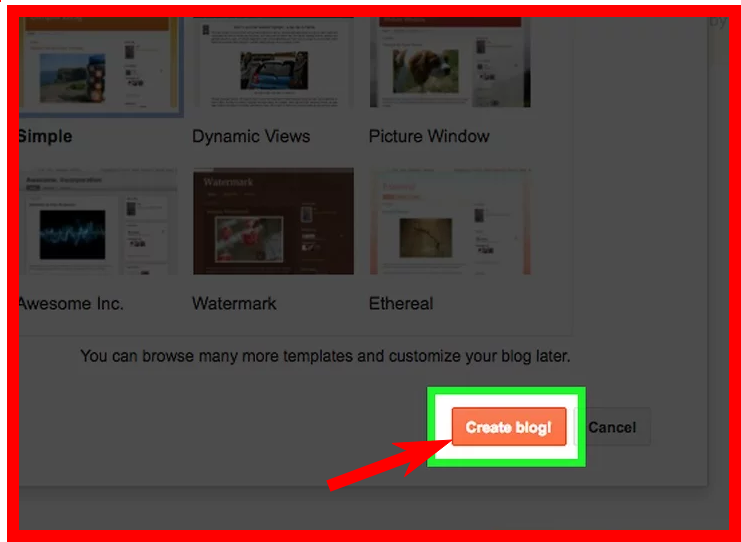
        Step 4:- Now choose a simple template for your blog then click on Create Blog. Now your blog is done. You can see this video if face any problem


        After creating a blog you need customize your blog, for customizing a blog, you need to upload a template.
        After complete upload template, you need to customize this. You can customize this template that I use in my blog to see this under the video.
        Here I create a blog and customize this. This is my blog design Bangla tutorial series. Hope you can do this to start your earning.

        Must Know About How To Start Blog Writing And How To Earn Money Form Blog

        If you want to earn money from a blog you need must know that for start blog writing. Many peoples come and they start writing article or copy from other person articles for a post in his blog to start blog writing. That is not the right way to Start Blog Writing And Earn money Form Blog article. If you want to learn a perfect method for start blog writing and earn money from the blog you come in right place.
        Here is the method that you must know for Start blog Writing And Earn money Form Blog :

        1. Perfect Name For Blog: First you need to select the perfect name of your blog or website because a perfect name can be rank your blog, So you need to choose a good name of your blog for start blog writing.

        2. Domain and Hosting: Second thing if you want professionally start blog writing and want to earn money from the blog, you must need domain and hosting. When you are new, I think that is not the right choice to buy domain hosting, blogger or WordPress is best for you to start the blog writing in the first time. Then when you learn properly about blog then you can start your blog writing with domain and hosting. 

        3. Customize Themes: You need to learn how to customize blog themes because to make good looking themes is very helpfully for ordains attraction. 

        4. Write Perfect Article for Blog: If you don't know how to write a perfect article for the blog, You can't rank your article on google or another place. I perfect article very helpful for rank your blog.

        5. keyword Research, Backlinks, Social media marketing, SEO: keyword research, backlinks, social media marketing must know for getting more visitor in your site or blog so you need to learn about that.

        6. Submit in google/bing/ yahoo: After completing all process then you need to submit your article or blog post in google/bing/yahoo. That can help to rank your blog site on the fast page.

        7. Blog add with Adsense: Lastly, you need to add your blog with Adsense to earn money. Before adding Adsense with your blog you need must have 5 page like Home, About, Contact Us, Disclaimer, Privacy Policy. That helps to verify your blog or website.

        If you maintain this process you can earn money from the blog or you can start blog writing right now.


        5 Start Rating Best News Portal Theme For WordPress 2019

        1. News9Paper
        Features:
        All the blocks
        Live search with Ajax and up down keys
        One click demo install
        WPML support
        Woocommerce support
        Custom bbpress styling + custom login system
        Custom auto-scaling content blocks
        Responsive Google AdSense support
        Responsive ads support
        Inline Google AdSense or other ads
        Auto YouTube, Dailymotion and Vimeo thumb downloader
        Built-in review system
        SEO Friendly
        Built-in translation support
        Google fonts
        Sticky navigation menu
        Each category has:
        8 category templates styles
        12 category top posts styles – each with 7 unique grid styles
        19 custom module style (loop style)
        custom colors
        custom background image
        custom sidebar + position(left, full, right)
        Unlimited Sidebars 
        Built in related posts based on tags, author or category
        Easy Google Analytics support (just paste the code in our admin)
        14 footer layouts
        Custom page builder elements
        Big Grid slide
        12 Big Grids
        25 Blocks
        Social counter with 10 unique styles
        Instagram widget
        Weather widget
        Exchange widget
        News ticker
        Video playlist
        Text with title
        Ad box
        Homepage post
        Popular category
        IOS Slider
        Custom widgets
        Popular category widget – show the most popular category
        Author box widget – show authors sorted by the number of posts, or by name
        Social counter widget – a social counter that shows numbers of likes, followers or subscribers
        Ad box – allows you to select an ad zone (you define the responsive ad zones in our panel)
        25 Blocks
        Instagram widget
        Weather widget
        Exchange widget
        Slide
        Text with title

        2. NewsPoint
        3. Spider
        Theme Features:
        • Build with Latest Bootstrap Framework
        • Fully Responsive Layout
        • Light & Dark Versions
        • Layout[Wide & Boxed]
        • Revolution Slider
        • 10+ Topics
        • Unique Demos
        • 10+ Headers & Navigations
        • 20+ Ready Slider
        • Listing pages & Detail pages
        • Page / Post Layouts ( Right Sidebar, Left Sidebar, Full Width )
        • 10+ Theme Skins
        • OFF-canvas Mobile Navigation
        • Google AdSense Banners
        • Google Web Fonts
        • Ajax based Contact Form
        • Outstanding Support Services
        • Documentation

        4. Grand News | News Magazine


        5. NewsPlus - News and Magazine WordPress theme

        6. Newsmag - News Magazine Newspaper

        Version 4.8 – April 24th, 2019
        !IMPORTANT UPDATE NOTICE
        Newsmag Theme is now compliant with the Envato current WordPress Standards – WordPress Requirements. This update is different as it makes changes to the theme’ code structure. It doesn’t influence the functionality and features.
        Find all the details you need to know and do regarding this update in the dedicated article on our blog.
        • new: Introducing Mobile Theme plugin – We are delighted to give you a new, much easier way to create engaging experiences on mobile devices for your visitors.
        • new: Extended AMP Support. The Mobile Theme plugin is designed to integrate seamlessly with the official AMP plugin for WordPress.Together, they are a smart solution to quickly give you the best results and increase your page loading speed on mobile up to five times faster. The tagDiv AMP plugin is now discontinued.
        • new: Added Modified Date Option.
        • misc: We updated the WPBakery plugin to the latest version.
        • fix: Other various CSS fixes. The list of modified files

        7. News 24 - News Magazine, Soccer News & Sports News HTML Template

        Features:
        • 05 Demos Layout – News , Sports, Soccer and Fashion Magazine
        • RTL Demo Added
        • 07 Homepage Variations
        • 85+ Pages
        • Fully Responsive
        • Built with Bootstrap 3
        • Working Ajax Contact Form Included
        • Google Map
        • Mobile Browsers Compatible
        • Font Awesome Icons
        • W3C Valid HTML Code
        • Cross browser Compatible
        • Reliable support
        • Well Documented That’s Why Easy to Change

        8.Barta - News & Magazine WordPress Theme

        Features:
        Built Based on Bootstrap V 4.0
        Built Based on Elementor Page Builder
        7 Different Home pages
        4 Different Category pages
        3 Different post detail pages
        5 Header Style
        Ads Management
        20+ Custom Elementor addons with 30+ Layouts
        Lazy Load
        Category wise color
        Fully Responsive
        W3c Validated HTML5 & CSS3 Coding
        Clean & Modern Design
        All Modern Browser Compatible [IE 11+, Firefox, Chrome, Opera and Safari]
        Font Awesome (350+ Icons).
        Google Web Font.
        Well Documented.
        Easy Customizable and Flexible Elements.
        SEO Optimized
        Extensive and Quick Support.
        Free Lifetime Updates.

        9. Sahifa - Responsive WordPress News / Magazine / Blog Theme

        Features of Sahifa:
        • Fully Responsive ( with Option to Disable it ) .
        • Retina Ready .
        • Layouts Option ( Wide, Boxed, Framed )
        • WooCommerce Ready .
        • Buddypress Ready.
        • bbPress Ready .
        • WPML Ready .
        • Responsive Google AdSense
        • Compatible with Infinite Scroll plugin .
        • Mega menu .
        • Option to set Icons for the Main Menu Items .
        • Dark Skin .
        • RTL Support.
        • Drag Drop HomePage Builder with Multiple Blocks Layouts.
        • Unbranded Powerful Administration Panel.
        • Built-in Review System
        • Schema SEO Rich Snippet Review Microdata .
        • Sticky Navigation menu ( with option to Enable/disable) .
        • Support Multiple page post .
        • 650+ Google Web Fonts. (Change elements fonts in the theme settings)
        • Mobile devices Friendly
        • Background image ADS
        • One Click Auto-Install demo sample data
        • iLightBox Plugin Included.

        10. News247 - News Magazine WordPress Theme

        Template Features:
        • Drag and Drop Elementor Builder
        • 8 Home Variations
        • 7 Header Layouts
        • Mega Menu
        • Rich Theme Option
        • One Click Demo Import
        • 4 Category Templates
        • Sticky Menu
        • 4 clean Post Layouts
        • Full width and Boxed width Layout
        • Post Formate – Audio, Video, Gallery
        • Simple News247 Social Widget
        • Social Counter Widget
        • 16 News blocks ( Lots of possibilities with each block )
        • Multipage Design
        • Sidebar – Left, Right, None
        • Custom Widgets – Latest Post, Ads Image, Post Gallery, Social Button, About Me
        • News Ticker
        • Mega Menu
        • Compatible with Woocommerce
        • Compatible with WPML
        • Unlimited Color Styles
        • Breadcrumb Navigation
        • 3 Pagination styles
        • HTML5 Validated
        • Based on Twitter Bootstrap 4
        • Mobile Responsive
        • Best for SEO
        • FontAwesome icons
        • Installation Video
        • Google Web Fonts
        • Working Contact Form
        • Documentation
        • Child Theme Included
        • Free Updates
        • Easy to customize and user friendly